Format how prices look
Write your own price format for a currency, with or without the currency code, using placeholders for the amount, and see an example before you save.
Write how prices look in one currency, for example where the symbol goes and which separators the number uses. Each currency has two formats: one without the currency code and one with it.
Before you start
Add the currency first. See Add and publish currencies. Every currency already has a default format. You only need to write your own when the default does not suit your store.
Steps
Open Edit format
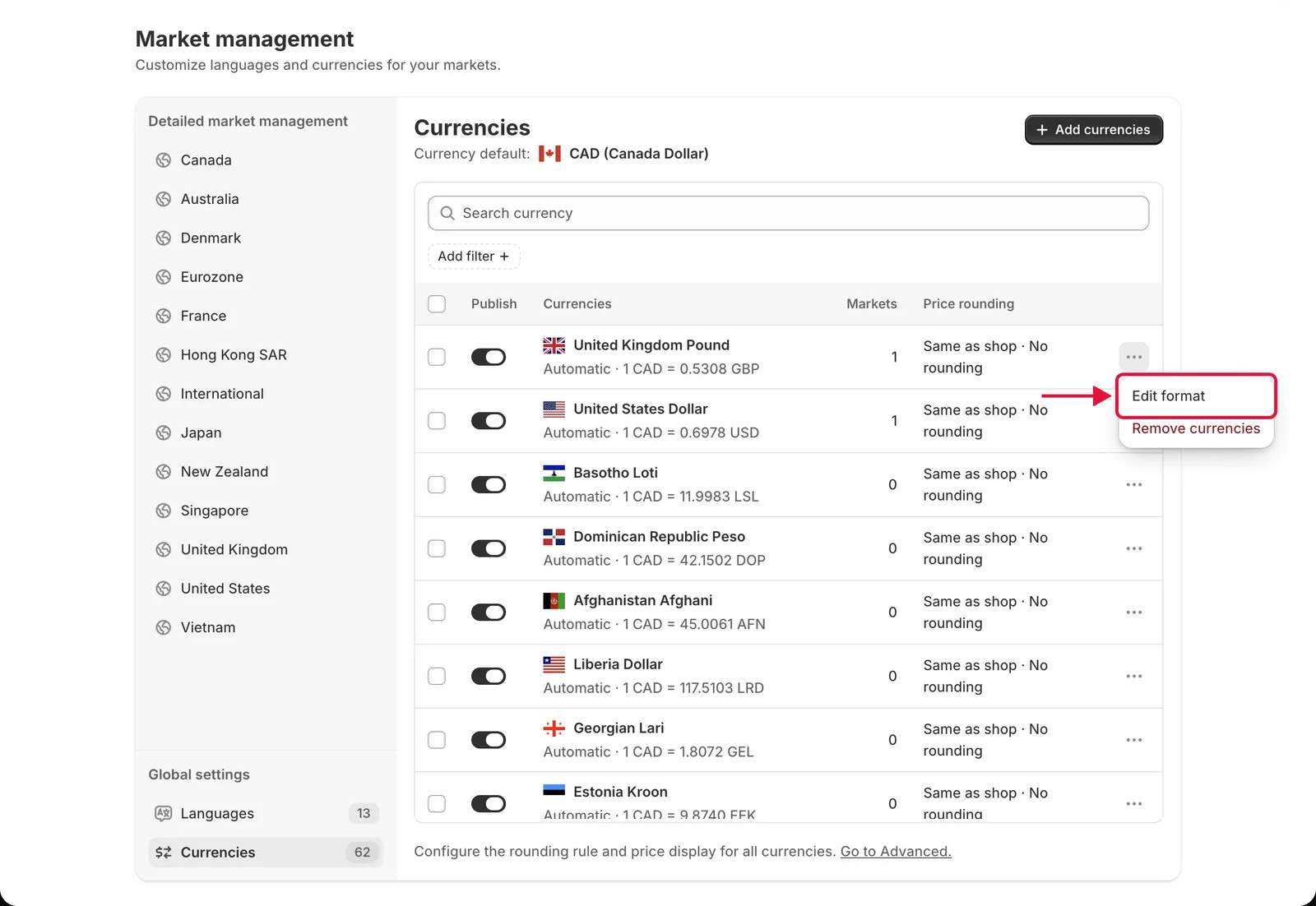
Open Gestão de mercados. Under Definições globais, click Moedas. Open the actions menu at the end of the currency row and click Editar formato.
Write the formats
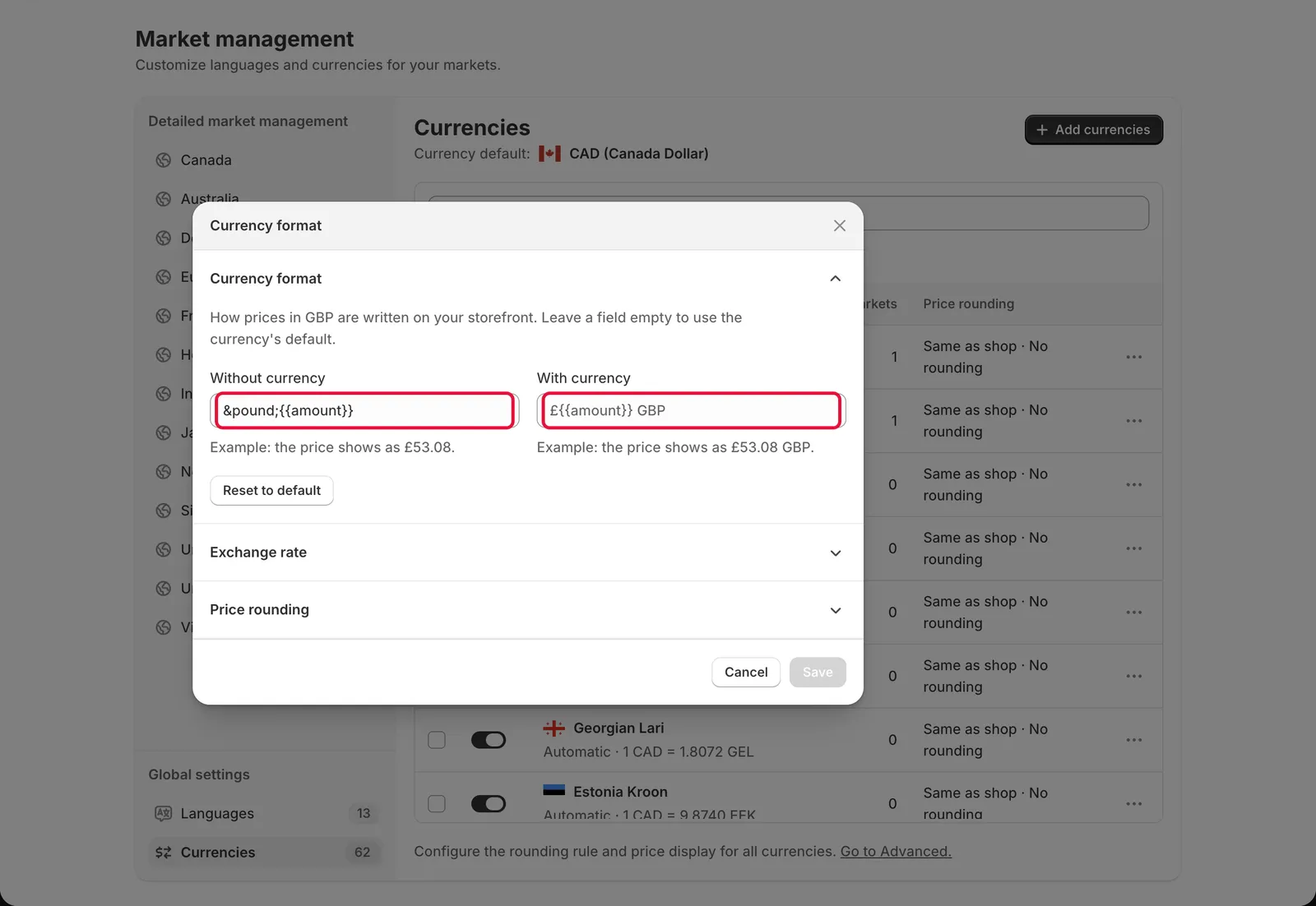
In the Formato de moeda section, fill in Sem moeda, Com moeda, or both. The grey text in each field is the default format. Leave a field empty to keep the default.
Check the example
Look at the example under each field. It shows a converted price written in your format.
Save the format
Click Guardar. The app shows Guardado and publishes the change to your storefront.
Placeholders
A format must contain one placeholder for the amount. The app shows the examples below for 1234.56.
| Placeholder | Result |
|---|---|
{{amount}} | 1,234.56 |
{{amount_no_decimals}} | 1,235 |
{{amount_with_comma_separator}} | 1.234,56 |
{{amount_no_decimals_with_comma_separator}} | 1.235 |
{{amount_with_apostrophe_separator}} | 1'234.56 |
{{amount_with_space_separator}} | 1 234,56 |
{{amount_no_decimals_with_space_separator}} | 1 235 |
Write anything else around the placeholder, such as a symbol or a code. For example, {{amount}} USD shows the code after the number.
Good to know
- The app does not accept a format without a placeholder, a placeholder it does not know, or HTML tags. The field shows what to fix and Guardar stays off until you fix it.
- A currency with its own number of decimals, such as the Japanese yen, can show fewer decimals than the placeholder suggests.
- To clear both formats, click Repor predefinição and save.
- Shoppers see one of the two formats on the whole storefront. You choose which one in Conta e definições, under Definições de localização, in Definições de moeda. Set Formato do preço convertido to Apenas símbolo ($10.00) to use the format without the code. Set it to Símbolo e código ($10.00 USD) to use the format with the code.
- This is not the money format of your Shopify store. For that, see Set up your store's money format.
Nota
While your store is in Multiple currencies mode, Shopify Markets formats prices. Editar formato is turned off. See Multiple currencies mode vs Switcher mode.
Artigos relacionados
Exchange rates: automatic, manual or with a markup
Choose how SmartCS converts your prices into each currency: the automatic daily rate, a rate you type, or the automatic rate plus a markup.
Round converted prices
Round converted prices to a clean step or to an ending such as .99, for your whole store or for one currency, and check an example before you save.
Última atualização: 18 de novembro de 2026