Add custom CSS to the switcher
Add your own CSS to change how the switcher looks on your store, and learn the size limit and what the field accepts.
Add your own CSS to change the look of the switcher in ways the style and colour settings do not cover.
이 기능은 문의하시면 켜 드립니다Before you start
- If the field is grey, custom CSS is not turned on for your store.
- Try the settings in Style and colours first. They need no code.
- You need to know basic CSS. SmartCS does not check that your rules do what you expect.
Steps
Open the Custom CSS block
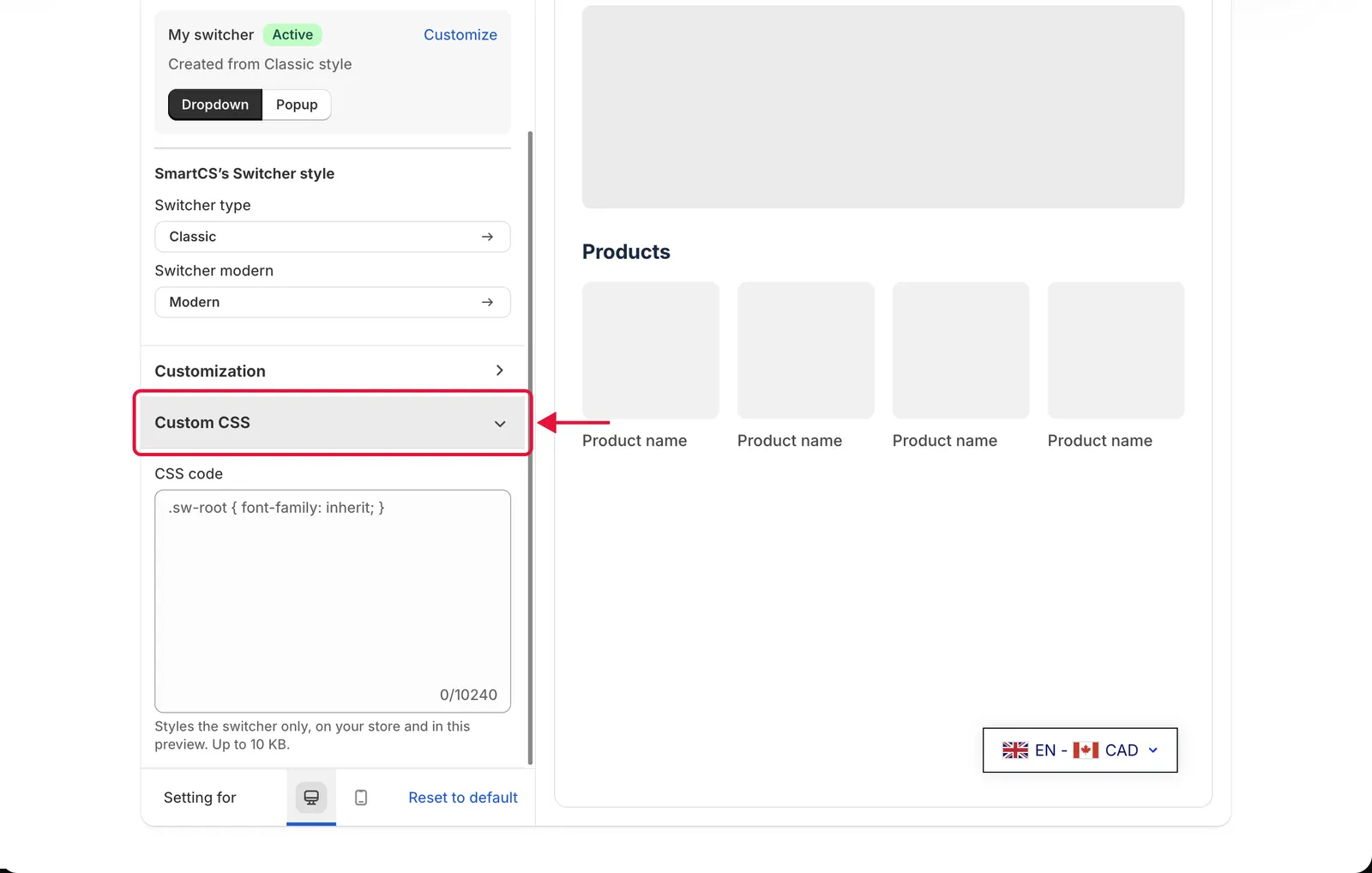
In SmartCS, open 스위처 설정. Click the 고급 tab. Click the 사용자 지정 CSS block to open it. It is the third block, after 템플릿 and 커스터마이징.
Write your CSS
Type or paste your rules in CSS 코드. The counter under the field counts characters, but the limit counts bytes. The grey example in the empty field shows the style of rule to write.
Check the preview
The preview shows your CSS as you type. It styles the switcher only, not the rest of the page.
Save your changes
Click 저장 in the save bar. SmartCS puts the CSS on your store with the rest of your switcher settings.
What the field accepts
- CSS only. You cannot add JavaScript. Anything you type is read as CSS and never run as code.
- Up to 10 KB. The limit counts bytes, not characters. A comment with accented or non-Latin letters uses more than 1 byte per letter, so it can pass the character count and still be too long. If your CSS is too long, the field shows 사용자 지정 CSS는 최대 10KB까지 입력할 수 있습니다. Shorten the CSS before you save.
- Switcher only. Your CSS styles the switcher only. Your theme's CSS does not reach into it.
- One CSS for both devices. To style only one device, write a media query. See Different settings for desktop and mobile.
경고
SmartCS does not filter your CSS. A rule such as one that moves or hides the switcher is applied as written. If the switcher disappears from your store, clear the field and save.
Good to know
- If your settings become too large to put on your store, the page shows 스위처 변경 사항이 아직 스토어에 적용되지 않았습니다. Shorten your CSS, then try again.
- Your CSS comes after the switcher's own styles. When two rules have the same weight, yours wins.
- When your store does not have custom CSS turned on, your saved CSS is kept but is not shown on your store.
관련 문서
Different settings for desktop and mobile
Set up the switcher separately for desktop and mobile, copy one device's settings to the other, and see which settings are shared.
Preview the switcher, choose who sees it, or reset
Choose who can see the switcher on your storefront, check how it looks before visitors do, and go back to the default settings.
최종 업데이트: 2026년 11월 18일